

#22 - How Small Businesses Are Beating Corporations With $20 AI Tools (Part 2)
The AI playbook for automating your biggest time-wasters this week


Welcome to 22nd issue of AI Agents Simplified. This issue is presented to you by Glean

If you’ve done the 15-minute AI opportunity audit from last week’s post, you’ll know what parts of your core processes AI can help streamline and enhance. Now it’s time to put those plans into action.
The following AI use cases are specially made for small businesses because they meet two critical criteria: they're "low-risk" (easy to test on a small scale without disrupting operations) and "high-return" (they can deliver significant time and cost savings quickly).
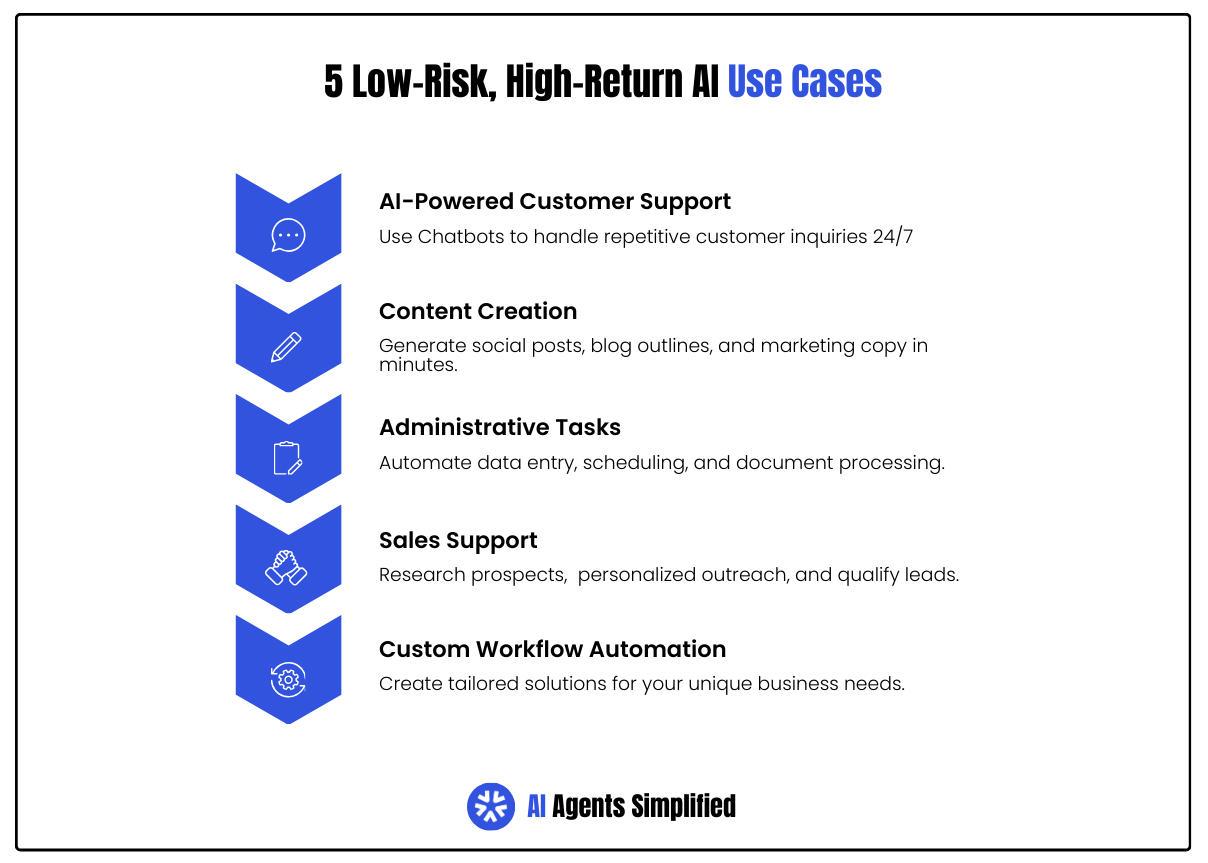
What makes them "low-risk" is that you can start with a single process or department, measure the results, expand gradually, then rollout to the rest of your team. If something doesn't work as expected, you can easily revert to your previous workflow. Since these solutions use mostly free or low-cost tools, the financial investment is minimal compared to the potential returns.
Each of these use cases has been successfully used by small businesses across different industries, and you don’t need significant technical knowledge to make them work.
1. AI-Powered Customer Support and Chatbots
Do you find yourself answering the same customer questions over and over again?
“When will I receive my package?”, “How can I request a refund?”, “What's your policy on returns?”
AI chatbots and customer service agents can handle front-facing customer inquiries on your website, social media pages, or email that need simple one-off responses. Any more complicated or sensitive issues can be flagged and forward to your customer service team when a human needs to be involved.
Tools needed: You can start with a free or low-cost chatbot platform (ManyChat or Dialogflow), and integrate ChatGPT to answer Facebook messages. Even without any coding or fancy automations, you can use ChatGPT itself to draft polite canned email responses to frequent queries.
Here are some super-simple implementation steps you can follow:
Make a list of 10-20 questions customers ask all the time
Write down your best answers to these questions
Sign up for ManyChat (free plan) and connect it to your Facebook page
Use ChatGPT ($20/month) to improve your answer templates
Copy-paste the templates into ManyChat for each question
Add a "Talk to a human" option that messages your team
Real-world example: An ecommerce business implemented a ChatGPT-powered customer service bot for about $5,000. This led to an estimated 30% reduction in support costs, translating to thousands of dollars saved annually, while also providing instant 24/7 customer responses and reducing human workload.
2. Content Creation and Marketing
Creating content - blog articles, social media posts, newsletters, etc. - is a task many small business owners struggle to keep up with, especially if you don’t have a formal background in writing, design, or content creation. Many business owners will often have a Facebook page or Instagram profile they update once in a blue moon as an afterthought, and leave it at that.
Tools like ChatGPT and Claude can drastically reduce content creation time, draft a month’s worth of social media posts, or generate a blog outline in seconds. Freelancers and small agencies report using AI to whip up social media captions and marketing copy “in minutes” rather than hours.
If you know what you’re doing and can use it strategically, its surprisingly good at making a passable first draft. You can take what it gives you, then you or your team can tweak it and edit for brand voice and tone. You’re still in control of the final output, and you’re not automating a critical system, just speeding up creative tasks.
Tools you need: The free version of ChatGPT or Claude is often sufficient for basic content, although the Plus/Pro models are better at writing naturally and mimicking human voice and tone. You might use ChatGPT to generate 5 variations of a product description for your online shop, then refine the best one. You can also use Perplexity to get quick facts or outlines as an input for the article, then have ChatGPT or Claude make the draft.
Some simple content creation implementation steps you can follow:
Make a list of content types you need regularly (social posts, emails, blog posts)
Sign up for free ChatGPT account or Claude
Create simple prompts like: "Write 5 Instagram captions about our new product [product name]"
Copy the AI response, edit it to match your voice, add your photos
Schedule posts using a free tool like Later or Buffer
Real-world example: Freelancers and small agencies report using AI to whip up social media captions and marketing copy "in minutes" rather than hours.
3. Streamlining Administrative Tasks (Scheduling, Data Entry, Documents)
Administrative busy-work is a prime area for automation. You would be amazed at how much time you spend answering emails and DMs, filling in spreadsheets, and compiling reports if you really tracked the hours you spend doing them.
Many of these admin tasks can be automated in-part or in full by AI.
Instead of manually entering customer info from an order form into your CRM and calendar, you could use an automation tool to do it for you, and even have an AI send a personalized confirmation email. You can also use AI to extract information from PDFs and Word docs, or let it scan invoices and receipts and categorize expenses.
AI doesn’t get tired or mistype numbers, so it’s less error-prone and more accurate with tasks like payroll and invoicing.
Tools: Many admin workflows can be done by n8n, Zapier, or Make.com, and connecting them to an AI service. You can use Calendly to automate your meeting scheduling, then have ChatGPT draft a polite email for attendees.
Follow these implementation steps to clear away those admin tasks for good:
Identify where you're copying data (like from emails to spreadsheets)
Sign up for Zapier (free plan for starters) or n8n (free if self-hosted)
Use their template for connecting your tools (e.g., Gmail to Google Sheets)
Test it with one simple workflow (like "When I get an email with 'Order' in the subject, add customer info to my spreadsheet")
Set it up and forget it
Real-world example: One small business used an AI-enhanced CRM to automatically log customer interactions and update contact details, eliminating manual data entry and saving hours each week.
4. Sales Support Enhancement
AI can be the perfect sales rep, and work for you behind the scenes researching potential clients, personalizing your outreach, and qualifying leads.
AI can amplify your sales efforts without adding headcount. Rather than hiring more salespeople, you can use AI tools to research prospects, qualify leads, personalize outreach, and even predict which deals are most likely to close.
The beauty of AI for sales support is that you can start small. Begin with a single pain point - like prospect research or email drafting - then expand as you see results.
Try these implementation steps to enhance your sales and lead generation:
Before contacting a prospect, search their company on Perplexity AI (free)
Ask: "What does [Company Name] do and what challenges are they facing?"
Take the summary and paste it into ChatGPT
Ask: "Write a friendly email to [Name] at [Company] mentioning that we can help with [challenge from research]"
Edit the draft and send it yourself\
Real-world example: A local law firm used AI tools to schedule client appointments 50% faster, draft routine legal docs 3× quicker, and research cases 20% more efficiently, meaning partners could take on more clients without hiring extra staff.
5. Custom Workflow Automation
If you need a little more specific or unique, there are tools for that too. No-code automatio platforms like n8n let you link together different tools with AI for custom-made visual workflows.
It might seem a little intimidating at first, but once you get used to the interface you can pick up on it pretty quickly. Start with small automations, targeting the tasks you identified in your audit, and let n8n handle the logic between them.
Let’s say you want to automate your client follow-up emails. Here’s an automated workflow you can put in place:
Download n8n desktop app (free)
Create a simple workflow that watches for important dates (like contract renewals)
Set it to automatically email clients 30 days before expiry
Add a second step that emails you if they don't respond
Let it run on its own
Real-world example: One small retailer used n8n to connect their online orders with a Google Sheets sales tracker and a Slack alert; it saved the owner from constantly copy-pasting orders and enabled real-time inventory updates.
Are you ready for AI Agents to enter the workforce?

AI Agents are moving from prototypes to production. In the Glean Agents whitepaper, you’ll get access to technical guidance on how to evaluate and implement agents in enterprise environments.
Download the whitepaper for free and get access to insights on how to accelerate delivery, reduce risk, and turn AI agent hype into real results.
When and How to Scale Your AI Implementation
After you've successfully implemented your first AI solution, you'll want to expand its use across your business. Here's a roadmap for growing your AI adoption:
Start Small and Build Confidence (Pilot Phase): Begin with a single, well-defined project. Experiment with small automations rather than attempting a big overhaul. Define clear success metrics and keep the scope limited. This builds confidence and buy-in for next steps.
Monitor, Measure, and Refine: As your pilot runs, closely monitor performance against your goals. Create a feedback loop with your team and address any issues. By iterating at this stage, you ensure you're scaling something that works well.
Train and Involve Your Team: Ensure your team is on board and empowered. Train staff on the AI tools – not in technical terms, but in how they'll use them day-to-day. Address concerns by emphasizing that AI assists rather than replaces their work.
Expand to New Use Cases Gradually: Apply AI to additional tasks or departments step by step, not all at once. Follow a crawl-walk-run strategy – maybe add one new automation per month. This ensures stability and quality.
Integrate and Optimize (Scale Phase): Connect your AI systems with broader operations. Future-proof your AI strategy by staying updated on new features and invest in your team's skills so you can self-serve without external help.
AI automation expert Mark Fulton stresses the importance of controlled, intentional rollout and building in human input and review along key steps in the process.
Automate email outreach to collect testimonials, automate onboarding steps, automate SEO article generation,” says Mark. “All of it must be done intentionally and tested, and refined thoroughly before deploying.
What people don't realize is that automation should not replace the human element entirely, you should build it to be as personable and guided as possible, and then make it run on its own. Have AI replace variables instead of writing an entire email.
By scaling in a controlled, value-driven way, you'll gradually evolve your internal processes to leverage AI effectively.
Use AI to Beat Your Competitors At Their Own Game
AI implementation doesn't have to be overwhelming or expensive for small businesses. By following the roadmap outlined in this article, you can start seeing real benefits quickly.
Remember these key principles:
Identify problems first, tools second. Don't chase AI trends - focus on your specific business bottlenecks and find AI solutions that address them directly.
Start small, then scale. Begin with one high-impact, low-risk implementation. Once it's working well, gradually expand to other areas of your business.
Listen to your team. Your employees know where the friction points are. Their insights will help you pinpoint the most valuable AI opportunities and ensure successful adoption.
Evolve your processes gradually. AI implementation is a journey, not a one-time event. As you integrate these tools, your workflows and culture will naturally adapt.
Outmaneuver larger competitors. Small businesses can now leverage the same AI capabilities as corporations but with greater agility and less bureaucracy.
The time to start is now. Take 15 minutes today to audit your business processes, identify your first AI opportunity, and take that initial step toward a more efficient, competitive operation.
If you missed our previous issue, the first part of this post, check it out now:

 | A guest post by
|
Great Insight
N8N is definitely powerful. The library of pre built nodes and workflows is the best part. That said, when I started working in it I wound up having to write JavaScript for data transforms pretty quickly. Thats fine by me but if you don’t know how to code you can bang your head against a wall.