

Your AI Agent Has More Access Than You Think
Most teams lock down their code. Almost nobody locks down their agent's tools.


Welcome to the 58th issue of AI Agents Simplified 🍻
This issue is brought to you by HubSpot

Before we get into today’s issue, I wanted to share a quick note about an event I’ll be attending at the end of July. The Packt team has been kind enough to offer AI Agents Simplified readers a 40% discount code, so if you’re interested, you can check it out too.
Beyond Prompts: Learn to Build AI Agents with OpenAI Codex
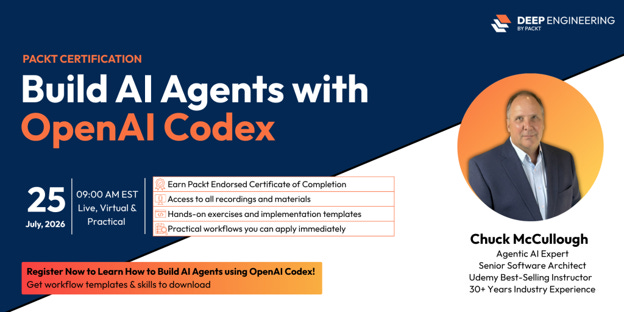
AI coding is evolving from code generation to agentic software development.
OpenAI Codex can do far more than autocomplete code. It can inspect repositories, plan implementations, write tests, debug failures, review pull requests, and help developers complete complex engineering tasks. The key is knowing how to guide these AI agents with the right workflows, guardrails, and review practices.
In this live, hands-on bootcamp, you’ll build practical AI-assisted development skills through 10 real-world engineering workflows. Working inside a prepared project, you’ll learn how to explore unfamiliar codebases, implement features safely, review AI-generated changes, refactor confidently, and ship production-ready code.
The bootcamp is led by Chuck McCullough, a software architect, former IBM engineer, and AI engineering expert with more than 30 years of experience building enterprise software and training developers worldwide.
Exclusive offer for AI Agents Simplified readers: Use code AISIM40 to get 40% off your registration.
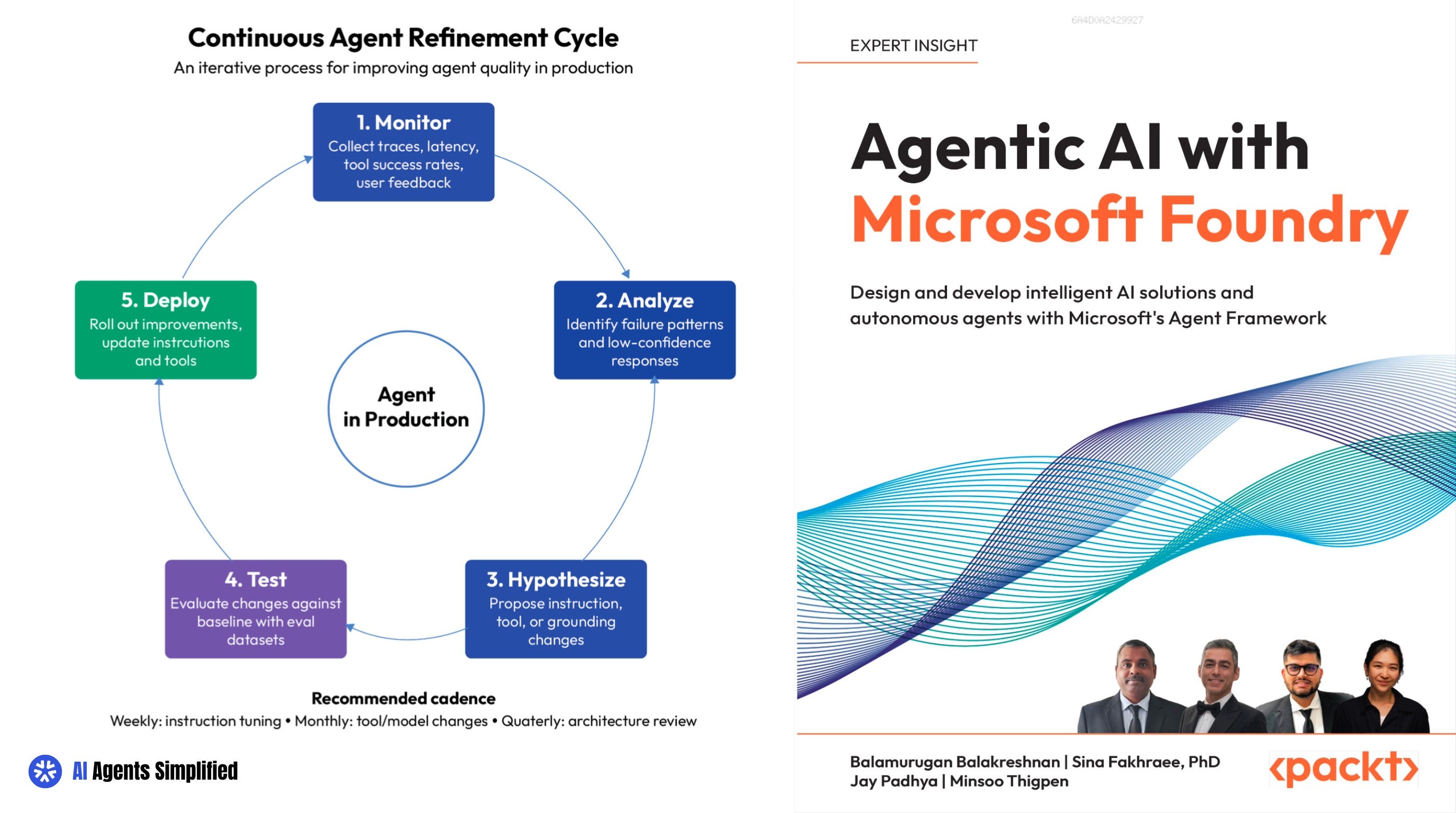
Here's a question worth asking about any agent you've built: what can it actually do, versus what you think it can do?
Most of us connect an agent to a tool, test it a few times, and move on. The agent answers questions correctly, so we assume it's safe. But "answers correctly" and "can't be talked into doing something bad" are two completely different things. And right now, most agents in production have never been checked for the second one.
That gap is the subject of this issue. It's also one of the best sections in Agentic AI with Microsoft Foundry, which spends real time on exactly this problem:
what your agent's tools can do?
who's watching when it uses them?
and how to test it before an attacker does?
The Question Changed, and Most People Didn't Notice!
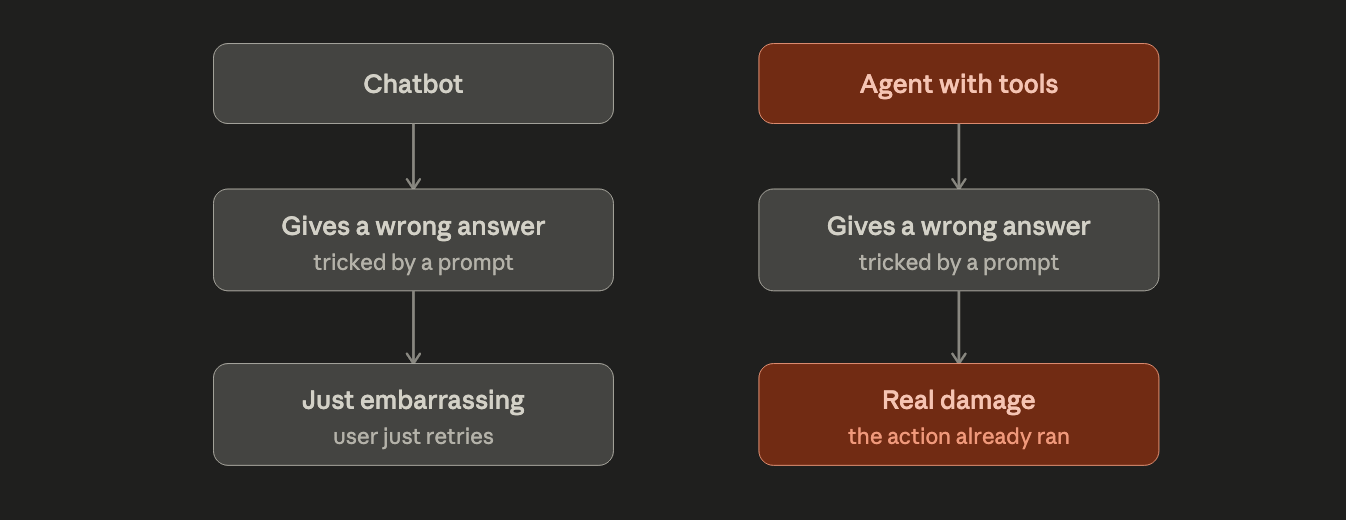
For a while, building an agent just meant getting good answers out of a model. Now agents call tools. They read your database, open tickets, send emails, touch your codebase. Once an agent can act, a bad answer isn’t just embarrassing. It’s a bad action, taken on your behalf!
This shift is why security researchers created an entirely new list of risks just for agents. In December 2025, OWASP published its first Top 10 for Agentic Applications. It’s different from the older list made for chatbots. It adds things like “agent goal hijack” and “tool misuse”, problems that only exist once an agent has real access to real systems.
The numbers back this up. HackerOne, the platform companies use to report security bugs, found that AI-related vulnerability reports jumped 210% in a year. Reports specifically about prompt injection, tricking a model into ignoring its instructions, jumped 540%.
Agentic AI with Microsoft Foundry covers this exact risk in its chapter on agent tools. The authors point out something simple but easy to miss: if you connect an agent to an external tool server and don’t explicitly limit what it can access, the agent inherits everything that server can do. For something like GitHub, that can include deleting a repository or force-pushing to a protected branch. Nobody asked for that. It just comes with the connection, by default.
The Fix Is Small. That’s Why People Skip It.
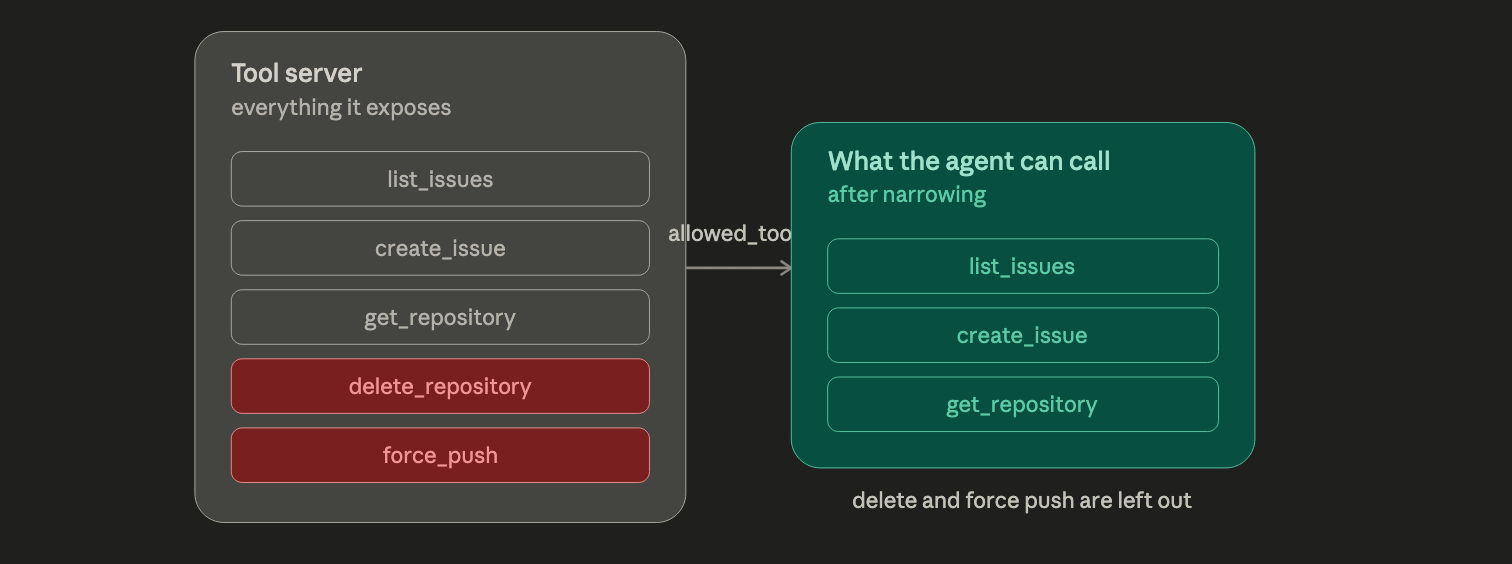
Here’s the part that’s easy to fix and easy to forget: give your agent a list of exactly which tools it’s allowed to use, instead of handing it everything.
The book walks through this using Microsoft’s Agent Framework, where you pass an allowed_tools list when you set up the connection. Want your agent to read issues and pull requests? Give it exactly that, and nothing else. No delete. No force-push. No access to anything you didn’t explicitly approve.
The authors put it in terms that make it click: treat this list the way you’d treat a permissions policy for an employee. Review it before you launch. Only add new tools after testing them somewhere that isn’t your live environment. It’s not something you set once, but it’s something you keep checking as your agent grows.
This one idea, on its own, is worth taking a look at the book. It’s the difference between an agent that can only do what you meant, and one that can do whatever the tool server happens to allow.
I put together a short checklist based on this issue, the tool permission review, the read/write approval split, and which red-team categories to run first. If you want it, drop a comment below and I’ll send it your way.
100+ ChatGPT Prompts to Revolutionize Your Day
Supercharge your productivity with HubSpot's comprehensive guide. This free resource is your fast track to AI mastery:
Industry-Specific Use Cases: 15+ real-world applications across various sectors
Productivity Guide: 21 best practices to 10x your efficiency with AI
Prompt Powerhouse: 100+ ready-to-use prompts for immediate implementation
Challenge Buster: Overcome common AI hurdles with expert strategies
Plus, in-depth sections on email composition, content creation, customer support, and data analysis.
Reading Isn't the Risk, Writing Is.
Limiting tool access handles part of the problem. The other part is what happens the moment your agent actually decides to use one of those tools.
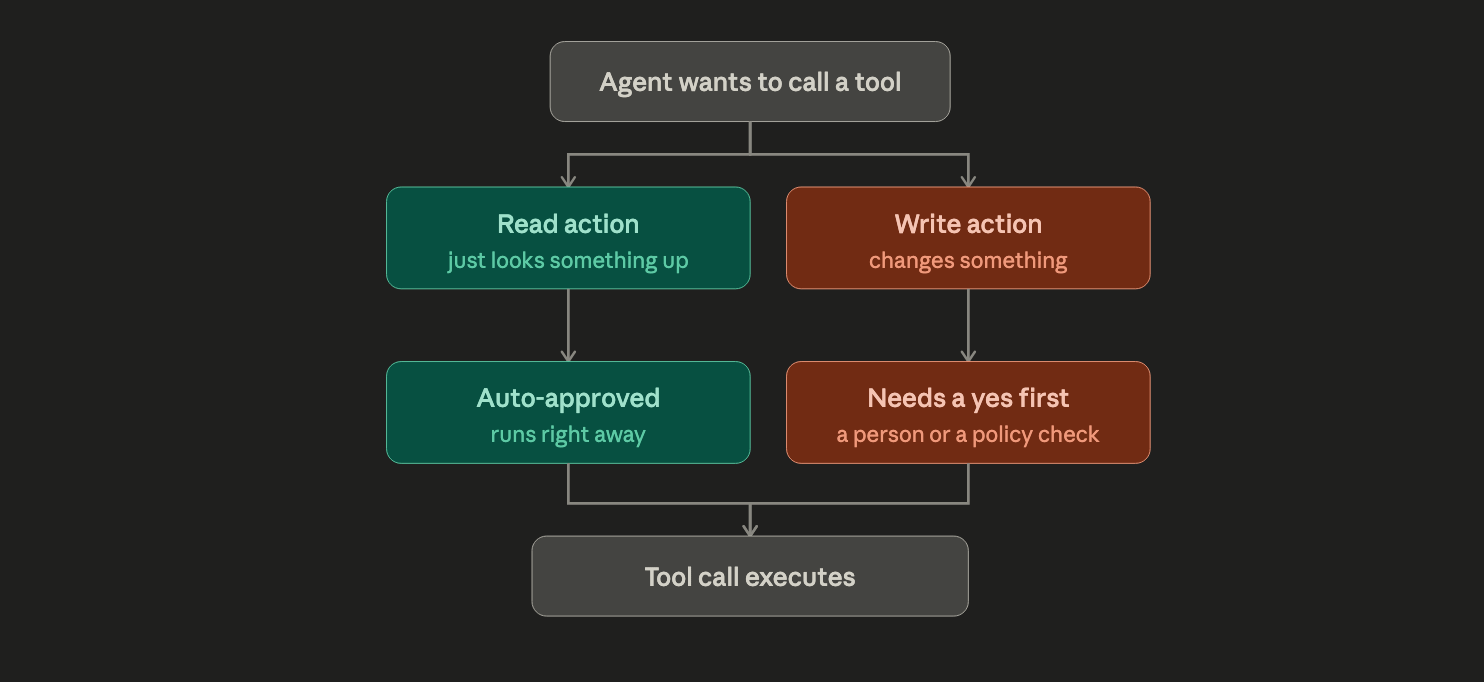
Agentic AI with Microsoft Foundry explains how Microsoft Foundry handles this. By default, any tool call needs a yes before it runs. The agent pauses, someone (or some system) approves or rejects it, and only then does it continue. The book shows the exact code for this approval step, including how to tell the difference between a “read” action and a “write” action.
That distinction matters more than it sounds like it should. An agent that only looks things up is low risk. An agent that can close a ticket, send an email, or delete something is not. The book’s advice:
Auto-approve the reads, and require a human or a policy check for anything that writes. You get a record of every action too, which matters a lot if you’re in healthcare, finance, or anything with rules attached.
Test Your Agent Like Someone's Trying to Break It
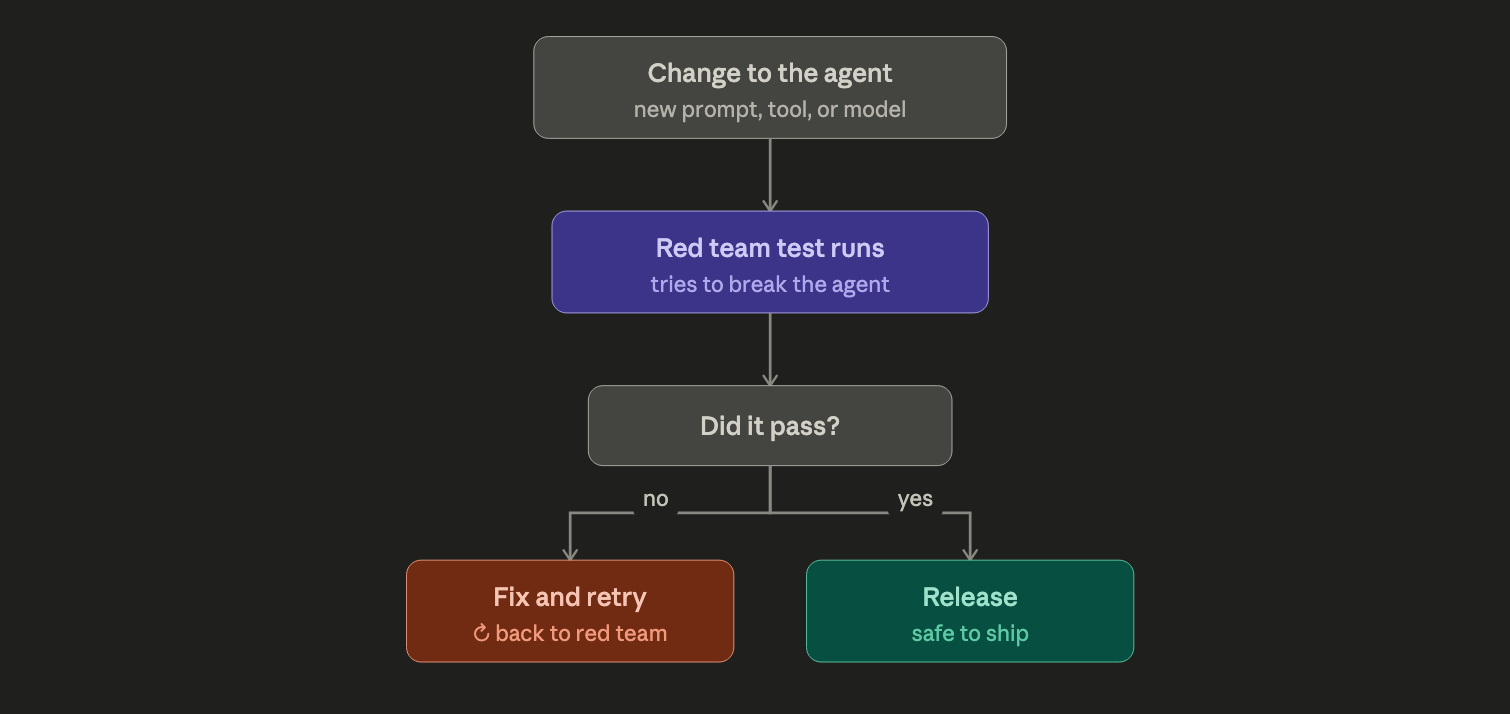
Even with a short tool list and an approval step, you still don’t know how your specific agent holds up against someone actually trying to trick it. That’s what red-teaming is for, and it’s stopped being something only security teams do.
Agentic AI with Microsoft Foundry dedicates a full section to this, using Microsoft Foundry’s built-in Red Team agent. You pick which risks to test for, choose the kinds of attacks to try, and it runs them against your agent automatically. The book walks through the entire setup, screen by screen, including how many attempts to run per risk category (they recommend 5 for a real deployment, not 1).
The book also makes a point that’s easy to miss:
This isn’t a one-time check before launch. Every time you change a prompt, add a tool, or switch models, the risk changes with it. The teams doing this well run these tests every time they release a change, the same way you’d run any other test before shipping code.
90% of AI Runs Through This Company

The biggest AI wins often come from companies you don’t hear about every day.
Case in point:
The database provider now embedded into the big three cloud platforms - with access to 90% of the market.
You’ll find the name and ticker of this newly-minted giant in our 10 Best AI Stocks to Own in 2026 report, along with:
The chip giant holding 80% of the AI data center market.
A plucky challenger with 28% revenue growth forecasts.
A multi-cloud operator with high-end analyst targets near $440.
Plus 6 other AI stocks set to take off.
The Next Step
If your agent touches anything real, a database, an inbox, a repository, anything that writes, its tool permissions deserve the same attention you’d give a production password. Most teams haven’t gotten there yet.
Agentic AI with Microsoft Foundry is the clearest walkthrough I’ve found for actually doing this. The tool permission pattern, the approval step, and the red-team setup, all with real code and real screenshots from Microsoft Foundry. If you’re building agents that touch anything important, it’s worth having next to you.
Let’s Collaborate
Hey there, I’m Hana, co-founder and technical writer at AI Agents Simplified. If you’re building in the AI space, have feedback on today’s post, or want to explore a collaboration, let’s chat! You can find me on LinkedIn or drop me an email. I read every message and would love to hear from you.
How are people not building and releasing agents with the bare minimum amount of privileges is beyond me. It is worrisome that developers don't follow the "Principle of Least Privilege" for anything designed anymore.
Good articles and points made here on these potential security issues.
I REALLY appreciate your warning people about this. I hope everyone reads it, and takes the appropriate actions and warns everyone they know to do the same thing, or malicious individuals will exploit this to the max, and cause Pols to enact limits to the tech, that will only accomplish slowing down progress.